Building a FlashCard SaaS Platform with Claude AI in One Month
. Reading time: 10 minutes.
From Zero to Production in 30 Days
How AI pair programming transformed a side project into a production-ready SaaS platform on Microsoft Azure
I set out to create a solution that would allow me to deepen my knowledge of Azure while simultaneously preparing for technical interviews. After experimenting with several existing apps and finding none that met my expectations, I decided to build my own platform from the ground up.
The Challenge
I wanted a tool to help me study, something that would sync seamlessly between my phone and PC, let me create flashcards quickly, and actually feel modern to use. Everything I found was either too basic, locked to a single platform, or missing the AI-powered features I knew were possible.
So I set two goals:
- Learn Azure properly — Identity flows, Entra, IaC, CI/CD, containers, and telemetry. Hands-on, not just theory.
- Build something real — Clean architecture, proper tests, documentation, and delivery practices I would use on a client project.
Building my own meant tackling real production challenges:
- User authentication and multi-tenancy — everyone’s data stays isolated
- CRUD operations — creating, managing, and organising decks and cards
- Cross-platform support — web first, mobile and desktop to follow
- Scalable infrastructure — designed for growth without rearchitecting later
- AI-powered generation — create complete decks just by describing a topic
Once the core platform is in place, I could even explore extensions such as spaced‑repetition and analytics.
The Secret Weapon
I started by using Copilot to create a high-level project plan that included sprints and work items for the entire build. I then fed that plan into Claude, which generated four repositories (backend, frontend, docs, and infrastructure) along with a file structure for each, including projects where applicable.
Claude effectively became my pair programmer: fast, consistent, and surprisingly capable, as long as I gave it clear task definitions, tight constraints, and concrete examples of what “good” looked like. The whole process ended up being part engineering exercise, part personal exploration.
What Claude took on:
- Deep feature and API implementation
- Complex, cross‑cutting refactors
- Co-authoring 180,000 words of documentation
- Architecture and decision analysis
- Debugging and problem solving
- Code review and consistency checks
The investment: I burned through roughly 3× the standard GitHub Copilot subscription ($19/month) that month — about $57 total on AI tooling. Compared to the time saved and knowledge gained, it was easily the best £45 I spent on the entire project.
The Documentation Strategy
Two decisions proved crucial.
First, a dedicated documents repository that doubled as the Azure DevOps wiki. Every ADR, API contract, and coding standard lived there, accessible to both humans and AI.
Second, a custom instructions file in each repository that automatically loaded project rules into every Claude session. This gave Claude persistent memory of project standards, so I never needed to re-explain conventions.
This cycle built up a substantial body of standards and kept the codebase consistent.
Development Velocity
With the documentation foundation in place, I worked through each feature methodically: backend implementation first, then backend unit tests. I kept this order intentionally so Claude would not touch or restructure the backend code once it was written. The frontend came next and was generated surprisingly quickly.
After the initial scaffolding, I spent a fair amount of time getting the backend and DevOps pieces deployed. Once those were working, I went back to the frontend, wrote unit tests, and deployed that too. Later on, I then added the quiz mode, which took a few days and was mostly UI work. Everything ran through Azure DevOps, shipped to staging first, then out to production.
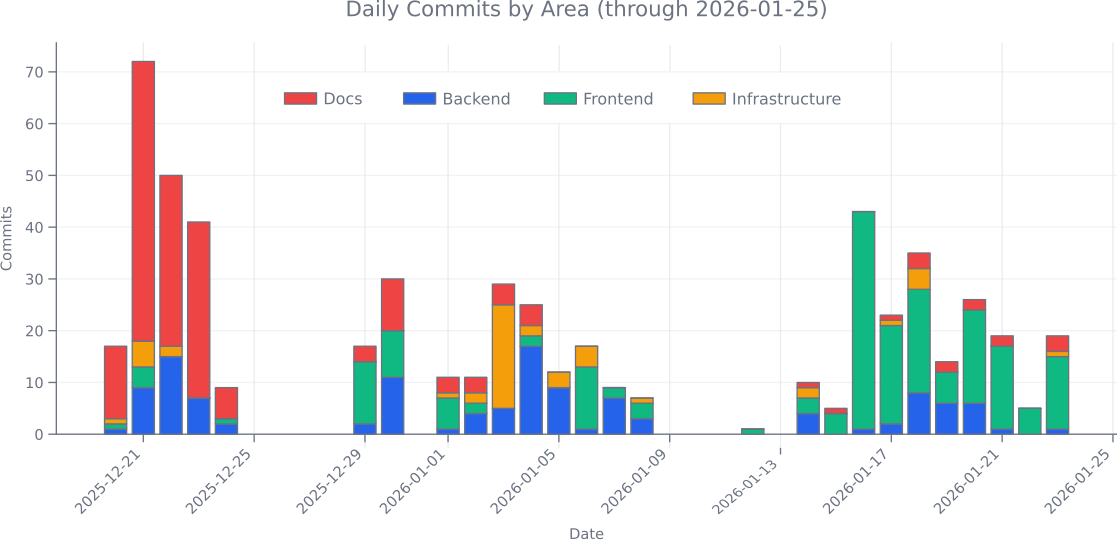
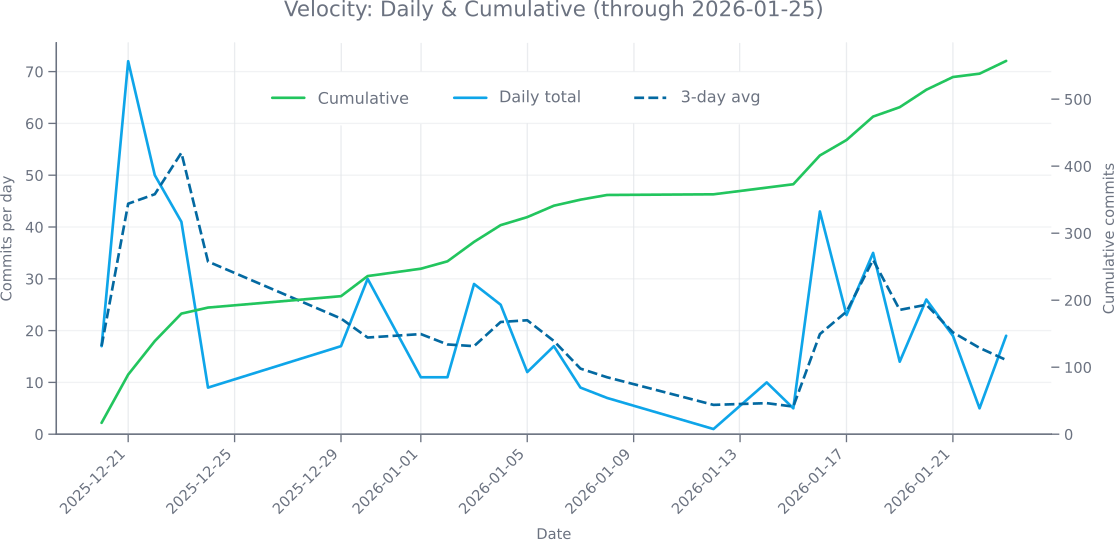
The commit history shows heavy documentation and backend scaffolding being created upfront (Claude’s strength), then steady feature development as the architecture solidified:
AI-Powered Deck Generation
One of the standout features Claude helped build was the Wizard. Just describe what you want to learn, pick your study mode, and AI generates a complete deck for you:
flowchart LR
Topic["📝 Describe Topic"] --> Mode{"🎯 Choose<br/>Study Mode"}
Mode -->|Stack| Stack["🃏 Q&A pairs<br/>flip-through review"]
Mode -->|Quiz| Quiz["❓ Multiple choice<br/>self-testing"]
Stack --> AI["🤖 GPT-4o-mini<br/>AI Processing"]
Quiz --> AI
AI --> Deck["📚 Ready to Study!<br/>Edit anytime"]
Once created, your deck is saved. Edit cards whenever you want, study as often as you like, the AI only runs once during creation, so there’s no extra cost when you come back. The architecture is extensible too, so I can add more quiz types and study modes later.
Popular topics users have generated:
- “Spanish vocabulary for travel”
- “AWS certification prep”
- “JavaScript interview questions”
- “Medical terminology basics”
Lessons Learned
✅ What Surprised Me (In a Good Way)
- Speed of Iteration — AI generated working code in seconds instead of minutes or hours
- Documentation Quality — Clear, consistent technical writing across 180,000 words
- Architecture Exploration — Fast “what if” experiments to compare design options
- Code Consistency — A persistent instructions file kept style and patterns aligned across sessions
- Visual Work — I was genuinely surprised by how much I was able to achieve, especially the SVG work
🔄 What I Would Tune Further
- Context Management — The hardest part; keeping the AI “up to speed” across sessions meant using persistent instructions and tightly scoped prompts
- Verification Overhead — Every AI-generated change still needed careful review and validation
- Documentation Drift — Keeping docs accurate over time demanded deliberate, ongoing updates
- Auto-commit Behaviour — I repeatedly ran into issues with Claude and Copilot auto-committing changes, so I added branch protection in Azure DevOps to stop this
- AI Rabbit Holes — On occasion I ended up going down AI-generated rabbit holes and had to backtrack. After this happened a couple of times, I got better at spotting when it was about to happen
What I Built
flowchart TB
Browser["🌐 Browser<br/>💻 Desktop & 📱 Mobile"]
subgraph Azure["☁️ Azure Platform"]
SWA["🌐 Static Web Apps<br/>⚛️ React 19 SPA<br/>🎨 TypeScript + Vite"]
Auth["🔐 Entra External ID<br/>🔑 OAuth 2.0/OIDC<br/>👤 Multi-tenant Auth"]
API["📦 Container Apps<br/>⚙️ .NET 10 API<br/>🔄 CQRS + MediatR"]
SQL["💾 Azure SQL<br/>🗄️ Serverless DB<br/>⏸️ Auto-pause"]
AI["🤖 Azure OpenAI<br/>🧠 GPT-4o-mini<br/>✨ Deck Generation"]
end
Browser --> SWA
SWA --> Auth & API
Auth -.-> API
API --> SQL & AI
The end result is a production-ready platform running on Microsoft Azure. I went with a modular monolith using Clean Architecture, structured so I can extract into microservices later if I need to, but deployed as a single unit to keep things simple and cheap.
Backend: .NET 10 with Minimal APIs and MediatR for CQRS. Clean separation between commands, queries, and domain logic.
Frontend: React 19 SPA built with Vite and TypeScript, talking to the backend through a proper REST API.
Authentication: Microsoft Entra External ID handles all the identity stuff, OAuth 2.0/OIDC, social logins, the lot.
Infrastructure: Everything defined in Bicep templates and deployed through Azure Pipelines. Reproducible and automated.
Pay only for what you use, scales to zero when idle
Microsoft Entra ID with OAuth 2.0/OIDC
Generate flashcard decks from any topic
Web now, mobile and desktop coming soon
CI/CD Pipeline
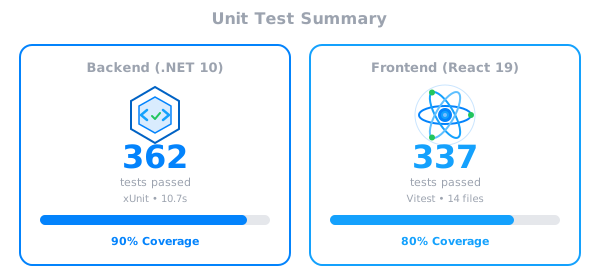
Every change must pass 80% test coverage, security scanning, and code quality gates before deployment. A manual approval step after staging ensures each release is deliberate.
flowchart LR
  Code["💻 Push"] --> Build["🔨 Build"]
  Build --> Test["🧪 Test"]
  Test --> Quality["✅ Quality"]
  Quality --> Staging["📦 Staging"]
  Staging --> Prod["🚀 Production"]
The test suite runs automatically on every pull request, covering both backend and frontend:
Cost Optimisation
I wanted to keep costs low. Really low. The platform runs two full environments (staging and production), but the monthly bill is a fraction of what traditional architecture would cost:
| Service | Configuration | Monthly Cost |
|---|---|---|
| Azure Container Apps (×2) | Staging + Prod (scale-to-zero) | £5-20 |
| Azure SQL Database (×2) | Staging + Prod (serverless, auto-pause) | £15-30 |
| Azure Static Web Apps | Free tier | £0 |
| Azure OpenAI | GPT-4o-mini (usage-based) | £5-15 |
| Entra External ID | Free tier (50k MAU) | £0 |
| Application Insights | Free tier (5GB) | £0-5 |
| Other (Key Vault, DNS, etc.) | Various | £2-5 |
| Total Infrastructure | £25-75/month |
That’s a 90% cost reduction compared to always-on architecture (£400-600/month for equivalent App Service and SQL tiers). It means I can offer the platform free to users and still maintain proper staging and production environments.
One trade-off: Scale-to-zero means a 60-90 second cold start when idle. I am working on pre-warmed instances to fix that while keeping costs down.
What’s Next
There is plenty more I would like to add:
Implement SM-2 algorithm to intelligently schedule card reviews at optimal intervals, maximising long-term retention while minimising study time
Enable users to publish decks publicly or share privately with teams, fostering a community-driven library of high-quality study materials
Visualise learning progress with retention curves, identify weak areas, and track study streaks to understand what’s working
Deploy iOS and Android apps using React Native, leveraging 75% shared codebase for consistent cross-platform experience
Conclusion
Building FlashStack in one month taught me more about Azure than months of tutorials ever could. But more than that, it showed me what is possible when you pair human direction with AI execution.
The experience was incredible. Yes, you need to keep guiding it. Yes, you need to review everything. But the speed at which you can go from idea to production-ready software? It changes what you think is possible. And honestly? Pretty addictive.
🎯 Ready to Try It?
Interested in how AI can accelerate your software development projects? Contact Smarter Business Tech to discuss your requirements.